Brock Beauchamp
-
Posts
551 -
Joined
-
Last visited
-
Days Won
334
Content Type
Profiles
News
New York Mets Videos
2026 New York Mets Top Prospects Ranking
New York Mets Free Agent & Trade Rumors, Notes, & Tidbits
Guides & Resources
The New York Mets Players Project
2026 New York Mets Draft Tracker: Picks & Bonuses
Forums
Blogs
Events
Store
Downloads
Gallery
Everything posted by Brock Beauchamp
-
 St. Lucie erupted for nine runs in the second inning behind Yohairo Cuevas, who homered and drove in two in a 10-3 win, while Antonio Jimenez added two hits and two RBIs. Syracuse rallied for four in the eighth to beat Norfolk 6-3, capped by Ryan Clifford's two-run double. Brooklyn coughed up a 4-0 lead in a 6-4 loss despite Dakota Hawkins striking out five over four scoreless. Binghamton fell 4-1 as R.J. Gordon allowed three runs. Mets Transactions New York Mets activated SS Zack Short. New York Mets designated SS Vidal Bruján for assignment. New York Mets signed free agent OF Nick Lucky to a minor league contract. New York Mets activated RHP Kodai Senga from the 15-day injured list. New York Mets optioned RHP Jonathan Pintaro to Syracuse Mets. Syracuse Rallies For Four In The Eighth To Topple Norfolk Syracuse scored four runs in the eighth inning to erase a deficit and beat the Norfolk Tides, 6-3. Trailing 3-2 entering the frame, the Mets tied it when Jackson Cluff doubled home Christian Arroyo. After a walk to Nick Morabito and a walk to Jihwan Bae loaded the bases, Andy Ibáñez lifted a sacrifice fly to score Cluff for the lead, and Ryan Clifford followed with a two-run double that scored Bae to make it 6-3. Cluff finished with a double, a run, and an RBI, while Clifford doubled and drove in a run. Grae Kessinger homered, scored, and drove in a run, and Morabito singled in a run as the leadoff hitter. Xzavion Curry turned in a strong start, working seven innings and allowing three runs on five hits with no walks and seven strikeouts, though two of those hits left the yard. Adbert Alzolay closed it out with two scoreless innings, allowing one hit and one walk while striking out one to earn the win. Syracuse left four runners on base. Player AB R H RBI BB K Nick Morabito 3 1 1 1 1 1 Ji Hwan Bae 3 1 0 0 1 2 Andy Ibáñez 3 0 0 1 0 0 Ryan Clifford 4 0 1 1 0 2 Grae Kessinger 4 1 1 1 0 1 Ben Rortvedt 3 0 0 0 0 1 Cristian Pache 3 1 1 0 0 0 Hayden Senger 2 0 0 0 1 1 Christian Arroyo 0 1 0 0 0 0 Kevin Parada 0 0 0 0 0 0 Jackson Cluff 3 1 1 1 0 0 Player IP H R ER BB K HR Xzavion Curry 7 5 3 3 0 7 2 Adbert Alzolay 2 1 0 0 1 1 0 Binghamton Held To One Run In 4-1 Loss To New Hampshire Binghamton managed just three hits in a 4-1 loss to the New Hampshire Fisher Cats. The lone run came in the seventh inning, when JT Schwartz homered to center field. Schwartz accounted for two of the team's three hits, scoring once and driving in one, while Vincent Perozo added the other hit. The Rumble Ponies drew three walks but stranded eight runners and struck out 10 times. R.J. Gordon took the loss, allowing three runs on four hits over 4 2/3 innings with three walks and one strikeout, with two of the hits leaving the yard. The bullpen kept it close from there, as Gabriel Rodriguez struck out three over 1 1/3 scoreless innings, Douglas Orellana allowed a run in one inning, and Garrett Stratton finished with two scoreless innings, allowing one hit and striking out one. Player AB R H RBI BB K Chris Suero 3 0 0 0 1 1 Jacob Reimer 4 0 0 0 0 1 Matt Rudick 4 0 0 0 0 3 JT Schwartz 4 1 2 1 0 0 Vincent Perozo 3 0 1 0 0 1 Jaylen Palmer 2 0 0 0 1 1 Wyatt Young 4 0 0 0 0 0 Kevin Villavicencio 3 0 0 0 0 2 Diego Mosquera 2 0 0 0 1 1 Player IP H R ER BB K HR R.J. Gordon 4 2/3 4 3 3 3 1 2 Gabriel Rodriguez 1 1/3 0 0 0 2 3 0 Douglas Orellana 1 2 1 1 0 0 0 Garrett Stratton 2 1 0 0 0 1 0 Brooklyn Blows Four-Run Lead In Seventh-Inning Collapse Brooklyn carried a 4-0 lead into the seventh inning but surrendered five runs in the frame and fell to the Wilmington Blue Rocks, 6-4. The damage began with a two-run double, continued with run-scoring singles, and ended on a sacrifice fly that pushed Wilmington ahead 5-4. Daiverson Gutierrez powered the offense with three hits, including two doubles and a home run, scoring three times and driving in one. Mitch Voit drove in a run with a sacrifice fly as the leadoff hitter, and John Bay added an RBI. Dakota Hawkins was excellent, striking out five over four scoreless innings while allowing only two hits and no walks. Tanner Witt followed with three runs on four hits over two innings with two walks. Parker Carlson took the loss after allowing two runs in one inning, and Hoss Brewer struck out two in the final inning, allowing an unearned run. Brooklyn left 10 runners on base. Player AB R H RBI BB K Mitch Voit 3 0 0 1 0 0 Ronald Hernandez 4 0 0 0 0 1 Corey Collins 4 0 0 0 0 2 Daiverson Gutierrez 4 3 3 1 0 1 Yonatan Henriquez 3 0 0 0 1 1 John Bay 3 0 0 1 1 1 Colin Houck 3 0 1 0 1 1 JT Benson 3 1 1 0 1 0 Nick Roselli 3 0 1 0 1 1 Player IP H R ER BB K HR Dakota Hawkins 4 2 0 0 0 5 0 Tanner Witt 2 4 3 3 2 2 0 Parker Carlson 1 3 2 2 0 2 0 Hoss Brewer 1 1 1 0 1 2 0 St. Lucie Erupts For Nine In The Second In 10-3 Rout St. Lucie scored nine runs in the second inning and cruised past the Daytona Tortugas, 10-3. After falling behind 3-0 in the first, the Mets sent 13 men to the plate in the second. The rally opened on a throwing error, and Chase Meggers delivered a two-run single before Jeremy Rodriguez singled home another run to tie it. Trey Snyder put St. Lucie ahead with a two-run single, Antonio Jimenez followed with a two-run double, and Yohairo Cuevas capped the frame with a two-run home run that made it 9-3. Cuevas finished with two hits, two runs, and two RBIs, Jimenez added two hits and two RBIs, and both Snyder and Meggers drove in two apiece. Conner Ware allowed three runs on two hits with two walks and two strikeouts over two innings. The bullpen was outstanding behind him, combining for seven scoreless innings, as Zack Mack earned the win with two scoreless innings, Ernesto Mercedes struck out three over two scoreless frames, Joe Charles added two scoreless innings, and Caden Wooster finished with a scoreless ninth. St. Lucie left seven runners on base. Player AB R H RBI BB K Elian Peña 3 1 0 0 2 0 Trey Snyder 4 2 1 2 1 1 Antonio Jimenez 5 1 2 2 0 1 Yohairo Cuevas 4 2 2 2 1 0 Julio Zayas 3 1 1 1 1 0 Branny De Oleo 3 1 1 0 1 2 Chase Meggers 4 1 1 2 0 2 Simon Juan 4 0 1 0 0 0 Jeremy Rodriguez 4 1 1 1 0 0 Player IP H R ER BB K HR Conner Ware 2 2 3 3 2 2 0 Zack Mack 2 0 0 0 0 1 0 Ernesto Mercedes 2 0 0 0 1 3 0 Joe Charles 2 1 0 0 1 1 0 Caden Wooster 1 0 0 0 0 0 0 Top-20 Prospect Performance Carson Benge: DNP A.J. Ewing: DNP Jonah Tong: DNP Elian Peña: 0-for-3, R, 2 BB Jack Wenninger: DNP Ryan Clifford: 1-for-4, 2B, RBI, 2 K Jacob Reimer: 0-for-4, K Nick Morabito: 1-for-3, R, RBI, BB, K Mitch Voit: 0-for-3, RBI Jonathan Santucci: DNP Chris Suero: 0-for-3, BB, K Zach Thornton: DNP Wandy Asigen: DNP Will Watson: DNP Eli Serrano III: DNP Randy Guzman: DNP Ryan Lambert: DNP Dylan Ross: DNP Antonio Jimenez: 2-for-5, 2B, 2 RBI, K R.J. Gordon: 4 2/3 IP, 4 H, 3 R, 3 ER, 3 BB, 1 K, 2 HR View full article
 -
THU FRI SAT SUN MON TOT Luke Weaver 11 0 0 0 0 11 Jonathan Pintaro 0 0 0 0 55 55 Huascar Brazobán 0 19 0 11 0 30 Devin Williams 16 33 0 0 0 49 David Peterson 0 0 0 0 54 54 Cionel Pérez 0 15 0 20 0 35 Brooks Raley 20 22 0 0 0 42 Austin Warren 0 0 40 0 0 40 A.J. Minter 14 0 0 4 0 18
-
The old forum posts are back!
Brock Beauchamp replied to Brock Beauchamp's topic in Grand Central Mets Issues & Suggestions
I think I was drunk when I created the badge names, FTR. They're increasingly stupid as you go along. -
Hit the @ and then start typing their username. Select the name when it appears. @whippoorwill
-
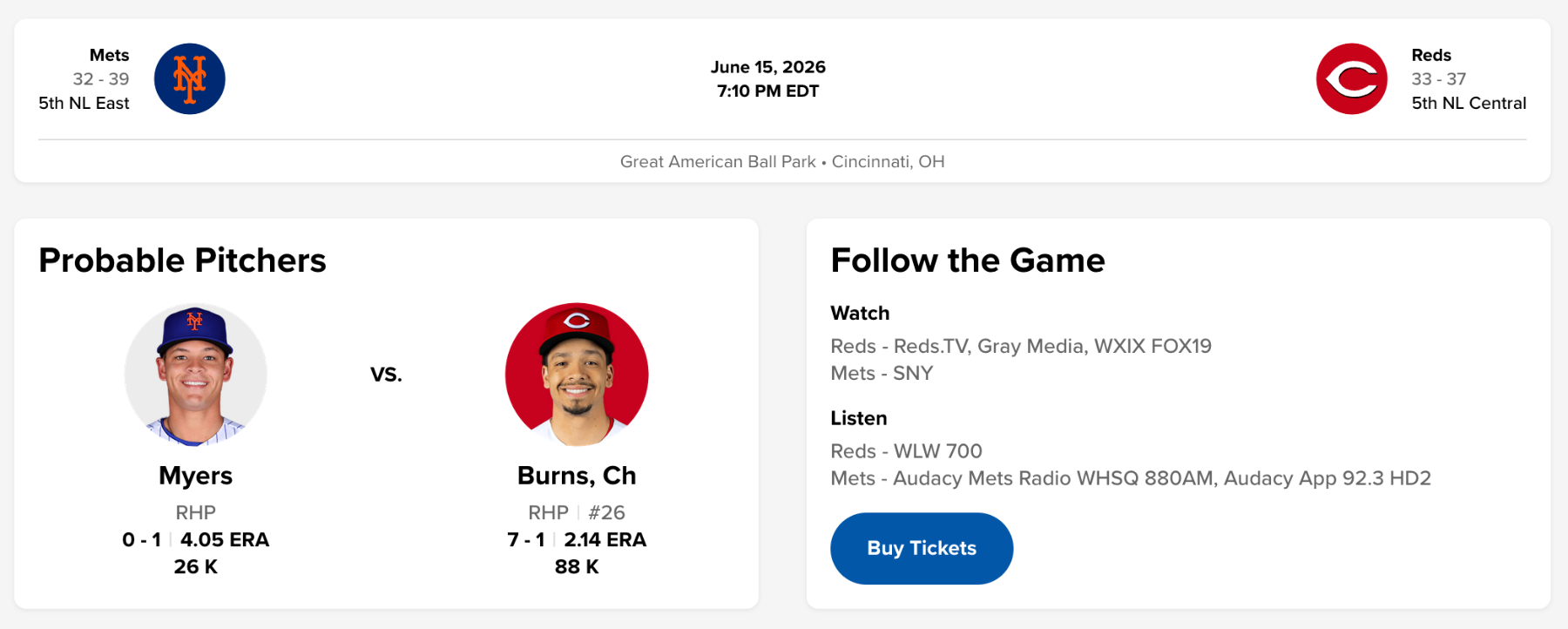
Alright, so the Mets had a good series against the Braves. Can they keep the momentum rolling against a much-less-good Reds team? WED THU FRI SAT SUN TOT Luke Weaver 0 11 0 0 0 11 Huascar Brazobán 0 0 19 0 11 30 Devin Williams 0 16 33 0 0 49 David Peterson 63 0 0 0 0 63 Daniel Duarte 0 0 0 13 15 28 Cionel Pérez 16 0 15 0 20 51 Brooks Raley 0 20 22 0 0 42 Austin Warren 33 0 0 40 0 73 A.J. Minter 0 14 0 0 4 18
-
It's a good thing for the Mets if Bichette opts out. I didn't like the contract at the time and I certainly don't like it now.
-
Mets Minor League Report: Reimer And Voit Power Affiliates
Brock Beauchamp posted an article in Minor Leagues
 Jacob Reimer's two-run homer lifted Binghamton to a 7-6 win in 10 innings, and Mitch Voit went 3-for-4 with three steals, including a steal of home, in Brooklyn's 7-4 victory. JT Benson added a three-run shot for the Cyclones, while Jose Chirinos struck out six over five innings. Jonah Tong fanned six but took the loss for Syracuse, and Christian Rodriguez earned the win in relief for St. Lucie. Mets Transactions No Roster Moves Syracuse Drops One-Run Game In Buffalo Despite Rortvedt's Three Hits The Syracuse Mets fell 4-3 to the Buffalo Bisons, leaving seven runners on base in a rain-shortened six-inning game. Ben Rortvedt led the offense with three hits, including a double, and Andy Ibáñez added two hits with a double. Matt Rudick also collected two hits, and Hayden Senger drove in two runs. Syracuse scratched out a run in the first when Cristian Pache grounded out to score Nick Morabito, then added another in the second on a Senger single that brought home Rortvedt. Jonah Tong allowed four runs on eight hits over five innings, walking one and striking out six, but the home half of the third proved decisive. Buffalo took the lead there on a two-run homer, having tied the game in the second on a double. The Bisons added an insurance run in the fourth on an RBI single. Syracuse pulled within one in the sixth when Senger lifted a sacrifice fly to score Jackson Cluff, but the comeback stalled. Jefry Yan worked a scoreless inning in relief, allowing no hits and striking out two. Player AB R H RBI BB K Nick Morabito 2 1 0 0 0 1 Yonny Hernández 4 0 1 0 0 1 Andy Ibáñez 3 0 2 0 0 0 Cristian Pache 3 0 0 1 0 0 Jackson Cluff 3 1 1 0 0 1 Grae Kessinger 3 0 0 0 0 2 Ben Rortvedt 3 1 3 0 0 0 Hayden Senger 2 0 1 2 0 0 Matt Rudick 3 0 2 0 0 0 Player IP H R ER BB K HR Jonah Tong 5 8 4 4 1 6 1 Jefry Yan 1 0 0 0 0 2 0 Reimer's Homer Caps Binghamton's Extra-Inning Win In Somerset The Binghamton Rumble Ponies fell to the Somerset Patriots 7-6 in 10 innings, stranding eight runners. Jose Ramos went 3-for-5 with two RBI, Jacob Reimer homered and drove in two, and TT Bowens added two hits with a double and an RBI. Chris Suero scored twice from the leadoff spot. Binghamton struck first in the second, when Kevin Villavicencio singled home a run, and Bowens doubled in another. Somerset answered in a big way against Max Green, scoring three in the third on an RBI single and a two-run double, then three more in the fourth on three straight run-scoring hits. Green was charged with six runs on eight hits over 3 1/3 innings, striking out one. Binghamton clawed back with two in the fifth on Ramos's single, then tied it in the seventh on Reimer's two-run homer that scored Suero. The bullpen kept it level, as Zach Peek, Carlos Guzman, and Saul Garcia combined for five scoreless innings, but Somerset pushed across the winning run in the 10th when the zombie runner scored on a throwing error. Player AB R H RBI BB K Chris Suero 4 2 1 0 0 0 Jacob Reimer 4 1 1 2 1 2 Jose Ramos 5 0 3 2 0 1 Vincent Perozo 5 1 1 0 0 3 Jaylen Palmer 4 0 1 0 1 1 Wyatt Young 5 0 0 0 0 0 Kevin Villavicencio 4 1 1 1 1 1 TT Bowens 4 1 2 1 0 0 Diego Mosquera 4 0 0 0 0 2 Player IP H R ER BB K HR Max Green 3 1/3 8 6 6 0 1 0 Felipe De La Cruz 2/3 2 0 0 1 2 0 Zach Peek 2 0 0 0 2 2 0 Carlos Guzman 2 0 0 0 0 1 0 Saul Garcia 1 1 0 0 1 2 0 Dan Hammer 0 0 1 0 0 0 0 Voit Steals Home, Benson Goes Deep As Brooklyn Beats Frederick The Brooklyn Cyclones defeated the Frederick Keys 7-4, leaving five runners on base. Leadoff man Mitch Voit went 3-for-4 with two RBI and three stolen bases, while JT Benson drove in three runs with a homer. The third inning broke the game open as Brooklyn plated five. Voit started the scoring with an RBI single that scored Sam Biller, then stole home as part of a double steal, and Benson capped the frame with a three-run blast to left center. Jose Chirinos turned in a strong start, allowing two runs, one earned, on six hits over five innings, walking two and striking out six. Frederick chipped away with two runs in the fourth, one on a solo homer and one on an error, and added single runs in the sixth and seventh. Brooklyn answered the sixth-inning pressure with two of its own, as Nick Roselli singled home a run and Voit added another RBI single. Danis Correa and Gregori Louis closed it out, with Louis recording the save. Player AB R H RBI BB K Mitch Voit 4 1 3 2 0 0 Yonatan Henriquez 4 0 0 0 0 0 John Bay 2 1 0 0 2 1 Daiverson Gutierrez 3 1 0 0 1 0 JT Benson 4 2 1 3 0 0 Colin Houck 4 0 1 0 0 0 Trace Willhoite 4 0 1 0 0 2 Sam Biller 3 2 1 0 1 0 Nick Roselli 4 0 1 1 0 2 Player IP H R ER BB K HR Jose Chirinos 5 6 2 1 2 6 1 Justin Armbruester 1 1 1 1 0 1 0 Bryce Jenkins 1 1 1 1 0 1 0 Danis Correa 1 0 0 0 0 1 0 Gregori Louis 1 1 0 0 1 2 0 St. Lucie's Bats Stifles Palm Beach Bats In 3-1 Win The St. Lucie Mets won a 3-1 decision over the Palm Beach Cardinals, managing four hits and leaving five runners on base. Simon Juan provided the lone extra-base hit with a solo homer in the second, his fifth of the year, and Trey Snyder added two hits. Leadoff hitter Elian Peña reached and scored twice. After Juan's homer staked St. Lucie to an early lead, the team added a run in the third when Antonio Jimenez grounded out to score Peña. Cam Tilly was sharp in his start, allowing one unearned run on two hits over 3 2/3 innings with three strikeouts and no walks. Christian Rodriguez followed with 2 1/3 scoreless innings, allowing one hit and striking out three to earn the win. Miguel Mejias and Joe Scarborough combined for two more scoreless frames, with Scarborough notching the save. St. Lucie pushed across a final run in the eighth when Yohairo Cuevas grounded into a force out to score Peña, but the offense could not generate enough against Palm Beach, striking out 11 times. Player AB R H RBI BB K Elian Peña 4 2 1 0 0 1 Trey Snyder 4 0 2 0 0 0 Antonio Jimenez 4 0 0 1 0 1 Yohairo Cuevas 3 0 0 1 1 2 Simon Juan 4 1 1 1 0 3 Chase Meggers 3 0 0 0 0 2 Jeremy Rodriguez 3 0 0 0 0 0 Jackson Hauge 3 0 0 0 0 0 Jack Scanlon 2 0 0 0 1 2 Player IP H R ER BB K HR Cam Tilly 3 2/3 2 1 0 0 3 0 Christian Rodriguez 2 1/3 1 0 0 1 3 0 Miguel Mejias 1 2/3 0 0 0 1 1 0 Joe Scarborough 1/3 0 0 0 1 0 0 Top-20 Prospect Performance Carson Benge: DNP A.J. Ewing: DNP Jonah Tong: 5 IP, 8 H, 4 R, 4 ER, 1 BB, 6 K, 1 HR Elian Pena: 1-for-4, 2 R, K Jack Wenninger: DNP Ryan Clifford: DNP Jacob Reimer: 1-for-4, HR, 2 RBI, BB, 2 K Nick Morabito: 0-for-2, R, K Mitch Voit: 3-for-4, 2 RBI, 3 SB Jonathan Santucci: DNP Chris Suero: 1-for-4, 2 R Zach Thornton: DNP Wandy Asigen: DNP Will Watson: DNP Eli Serrano III: DNP Randy Guzman: DNP Ryan Lambert: DNP Dylan Ross: DNP Antonio Jimenez: 0-for-4, RBI, K R.J. Gordon: DNP
 -
Jacob Reimer's two-run homer lifted Binghamton to a 7-6 win in 10 innings, and Mitch Voit went 3-for-4 with three steals, including a steal of home, in Brooklyn's 7-4 victory. JT Benson added a three-run shot for the Cyclones, while Jose Chirinos struck out six over five innings. Jonah Tong fanned six but took the loss for Syracuse, and Christian Rodriguez earned the win in relief for St. Lucie. Mets Transactions No Roster Moves Syracuse Drops One-Run Game In Buffalo Despite Rortvedt's Three Hits The Syracuse Mets fell 4-3 to the Buffalo Bisons, leaving seven runners on base in a rain-shortened six-inning game. Ben Rortvedt led the offense with three hits, including a double, and Andy Ibáñez added two hits with a double. Matt Rudick also collected two hits, and Hayden Senger drove in two runs. Syracuse scratched out a run in the first when Cristian Pache grounded out to score Nick Morabito, then added another in the second on a Senger single that brought home Rortvedt. Jonah Tong allowed four runs on eight hits over five innings, walking one and striking out six, but the home half of the third proved decisive. Buffalo took the lead there on a two-run homer, having tied the game in the second on a double. The Bisons added an insurance run in the fourth on an RBI single. Syracuse pulled within one in the sixth when Senger lifted a sacrifice fly to score Jackson Cluff, but the comeback stalled. Jefry Yan worked a scoreless inning in relief, allowing no hits and striking out two. Player AB R H RBI BB K Nick Morabito 2 1 0 0 0 1 Yonny Hernández 4 0 1 0 0 1 Andy Ibáñez 3 0 2 0 0 0 Cristian Pache 3 0 0 1 0 0 Jackson Cluff 3 1 1 0 0 1 Grae Kessinger 3 0 0 0 0 2 Ben Rortvedt 3 1 3 0 0 0 Hayden Senger 2 0 1 2 0 0 Matt Rudick 3 0 2 0 0 0 Player IP H R ER BB K HR Jonah Tong 5 8 4 4 1 6 1 Jefry Yan 1 0 0 0 0 2 0 Reimer's Homer Caps Binghamton's Extra-Inning Win In Somerset The Binghamton Rumble Ponies fell to the Somerset Patriots 7-6 in 10 innings, stranding eight runners. Jose Ramos went 3-for-5 with two RBI, Jacob Reimer homered and drove in two, and TT Bowens added two hits with a double and an RBI. Chris Suero scored twice from the leadoff spot. Binghamton struck first in the second, when Kevin Villavicencio singled home a run, and Bowens doubled in another. Somerset answered in a big way against Max Green, scoring three in the third on an RBI single and a two-run double, then three more in the fourth on three straight run-scoring hits. Green was charged with six runs on eight hits over 3 1/3 innings, striking out one. Binghamton clawed back with two in the fifth on Ramos's single, then tied it in the seventh on Reimer's two-run homer that scored Suero. The bullpen kept it level, as Zach Peek, Carlos Guzman, and Saul Garcia combined for five scoreless innings, but Somerset pushed across the winning run in the 10th when the zombie runner scored on a throwing error. Player AB R H RBI BB K Chris Suero 4 2 1 0 0 0 Jacob Reimer 4 1 1 2 1 2 Jose Ramos 5 0 3 2 0 1 Vincent Perozo 5 1 1 0 0 3 Jaylen Palmer 4 0 1 0 1 1 Wyatt Young 5 0 0 0 0 0 Kevin Villavicencio 4 1 1 1 1 1 TT Bowens 4 1 2 1 0 0 Diego Mosquera 4 0 0 0 0 2 Player IP H R ER BB K HR Max Green 3 1/3 8 6 6 0 1 0 Felipe De La Cruz 2/3 2 0 0 1 2 0 Zach Peek 2 0 0 0 2 2 0 Carlos Guzman 2 0 0 0 0 1 0 Saul Garcia 1 1 0 0 1 2 0 Dan Hammer 0 0 1 0 0 0 0 Voit Steals Home, Benson Goes Deep As Brooklyn Beats Frederick The Brooklyn Cyclones defeated the Frederick Keys 7-4, leaving five runners on base. Leadoff man Mitch Voit went 3-for-4 with two RBI and three stolen bases, while JT Benson drove in three runs with a homer. The third inning broke the game open as Brooklyn plated five. Voit started the scoring with an RBI single that scored Sam Biller, then stole home as part of a double steal, and Benson capped the frame with a three-run blast to left center. Jose Chirinos turned in a strong start, allowing two runs, one earned, on six hits over five innings, walking two and striking out six. Frederick chipped away with two runs in the fourth, one on a solo homer and one on an error, and added single runs in the sixth and seventh. Brooklyn answered the sixth-inning pressure with two of its own, as Nick Roselli singled home a run and Voit added another RBI single. Danis Correa and Gregori Louis closed it out, with Louis recording the save. Player AB R H RBI BB K Mitch Voit 4 1 3 2 0 0 Yonatan Henriquez 4 0 0 0 0 0 John Bay 2 1 0 0 2 1 Daiverson Gutierrez 3 1 0 0 1 0 JT Benson 4 2 1 3 0 0 Colin Houck 4 0 1 0 0 0 Trace Willhoite 4 0 1 0 0 2 Sam Biller 3 2 1 0 1 0 Nick Roselli 4 0 1 1 0 2 Player IP H R ER BB K HR Jose Chirinos 5 6 2 1 2 6 1 Justin Armbruester 1 1 1 1 0 1 0 Bryce Jenkins 1 1 1 1 0 1 0 Danis Correa 1 0 0 0 0 1 0 Gregori Louis 1 1 0 0 1 2 0 St. Lucie's Bats Stifles Palm Beach Bats In 3-1 Win The St. Lucie Mets won a 3-1 decision over the Palm Beach Cardinals, managing four hits and leaving five runners on base. Simon Juan provided the lone extra-base hit with a solo homer in the second, his fifth of the year, and Trey Snyder added two hits. Leadoff hitter Elian Peña reached and scored twice. After Juan's homer staked St. Lucie to an early lead, the team added a run in the third when Antonio Jimenez grounded out to score Peña. Cam Tilly was sharp in his start, allowing one unearned run on two hits over 3 2/3 innings with three strikeouts and no walks. Christian Rodriguez followed with 2 1/3 scoreless innings, allowing one hit and striking out three to earn the win. Miguel Mejias and Joe Scarborough combined for two more scoreless frames, with Scarborough notching the save. St. Lucie pushed across a final run in the eighth when Yohairo Cuevas grounded into a force out to score Peña, but the offense could not generate enough against Palm Beach, striking out 11 times. Player AB R H RBI BB K Elian Peña 4 2 1 0 0 1 Trey Snyder 4 0 2 0 0 0 Antonio Jimenez 4 0 0 1 0 1 Yohairo Cuevas 3 0 0 1 1 2 Simon Juan 4 1 1 1 0 3 Chase Meggers 3 0 0 0 0 2 Jeremy Rodriguez 3 0 0 0 0 0 Jackson Hauge 3 0 0 0 0 0 Jack Scanlon 2 0 0 0 1 2 Player IP H R ER BB K HR Cam Tilly 3 2/3 2 1 0 0 3 0 Christian Rodriguez 2 1/3 1 0 0 1 3 0 Miguel Mejias 1 2/3 0 0 0 1 1 0 Joe Scarborough 1/3 0 0 0 1 0 0 Top-20 Prospect Performance Carson Benge: DNP A.J. Ewing: DNP Jonah Tong: 5 IP, 8 H, 4 R, 4 ER, 1 BB, 6 K, 1 HR Elian Pena: 1-for-4, 2 R, K Jack Wenninger: DNP Ryan Clifford: DNP Jacob Reimer: 1-for-4, HR, 2 RBI, BB, 2 K Nick Morabito: 0-for-2, R, K Mitch Voit: 3-for-4, 2 RBI, 3 SB Jonathan Santucci: DNP Chris Suero: 1-for-4, 2 R Zach Thornton: DNP Wandy Asigen: DNP Will Watson: DNP Eli Serrano III: DNP Randy Guzman: DNP Ryan Lambert: DNP Dylan Ross: DNP Antonio Jimenez: 0-for-4, RBI, K R.J. Gordon: DNP View full article
-
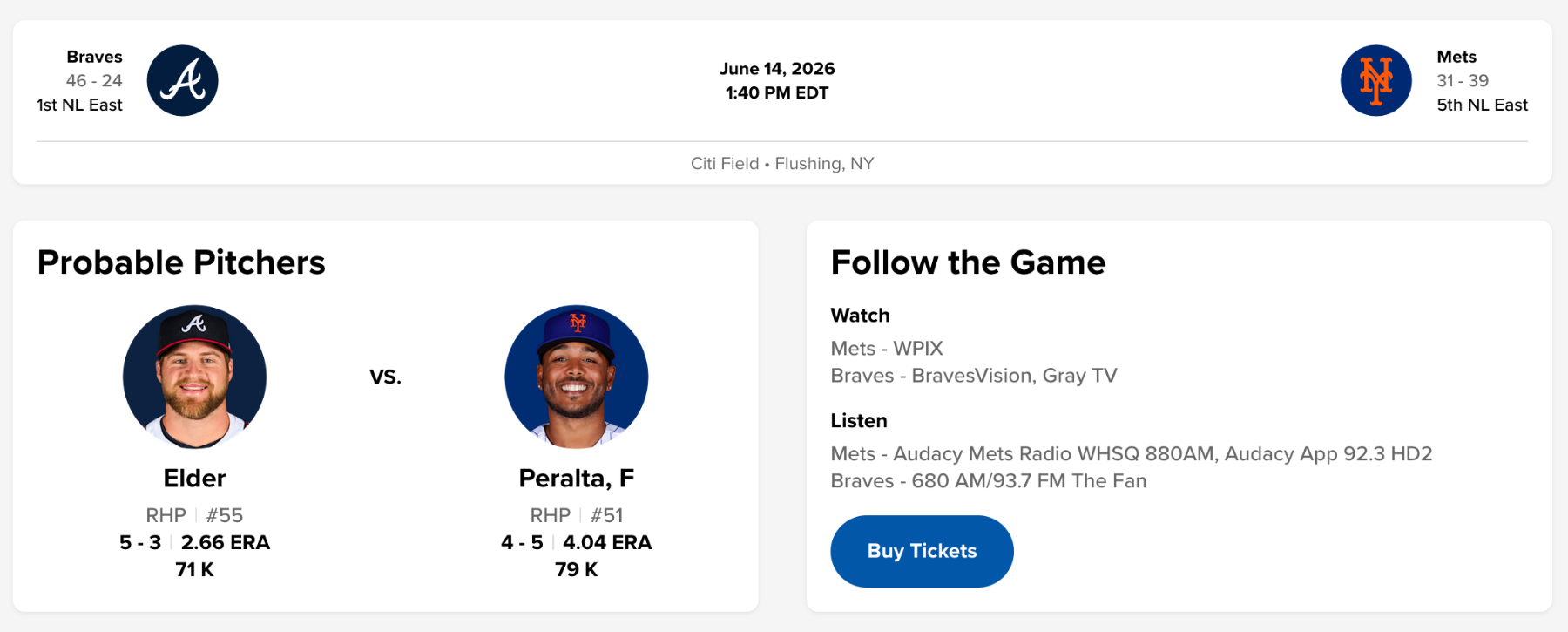
So, is everybody hung over from the Knicks game last night? I have a lot of in-law family in NYC, so I was rooting for the Knicks, but it was still kinda sad to see the Spurs fold over and over again. By the way, is the bullpen chart capturing openers correctly now? I think it's fixed now. TUE WED THU FRI SAT TOT Luke Weaver 0 0 11 0 0 11 Huascar Brazobán 0 0 0 19 0 19 Devin Williams 0 0 16 33 0 49 David Peterson 0 63 0 0 0 63 Daniel Duarte 0 0 0 0 13 13 Cionel Pérez 7 16 0 15 0 38 Brooks Raley 0 0 20 22 0 42 Austin Warren 0 33 0 0 40 73 A.J. Minter 0 0 14 0 0 14
-
The old forum posts are back!
Brock Beauchamp replied to Brock Beauchamp's topic in Grand Central Mets Issues & Suggestions
Alright, spent half an hour reintegrating a bunch of stuff. The Red Light forum is visible to all old-timey members, down in the archives section. I'll keep working on this later in the week. -
The old forum posts are back!
Brock Beauchamp replied to Brock Beauchamp's topic in Grand Central Mets Issues & Suggestions
Yep, it's there. -
The old forum posts are back!
Brock Beauchamp replied to Brock Beauchamp's topic in Grand Central Mets Issues & Suggestions
No, I'll be re-integrating them over the coming week. -
The old forum posts are back!
Brock Beauchamp replied to Brock Beauchamp's topic in Grand Central Mets Issues & Suggestions
No, sorry, gonna immortalize that with a special page of its own. -
Mets Minor League Report: Extra Innings Sink Syracuse, Brooklyn
Brock Beauchamp posted an article in Minor Leagues
 Jonathan Jimenez carried St. Lucie with six innings of one-run ball, and Yohairo Cuevas and Jeremy Rodriguez each collected three hits in a 10-1 rout. Elwis Mijares struck out three over two scoreless frames. Cristian Pache went 4-for-4 for Syracuse, but Buffalo walked off the Mets 8-7 in 10 innings. Vincent Perozo homered for Binghamton in a 4-3 loss, while Colin Houck and Corey Collins homered for Brooklyn in a 5-4 extra-inning defeat. Mets Transactions No Roster Moves Buffalo Walks Off Syracuse In Extras Despite Pache's Four Hits Syracuse fought back from an early hole but fell to the Buffalo Bisons 8-7 in 10 innings. Cristian Pache led the offense, going 4-for-4 with a double, a walk, and three runs scored. Jackson Cluff added three hits, and Nick Morabito went 2-for-4 with a walk and an RBI. Grae Kessinger drove in two runs, and Matt Rudick also knocked in two. The Mets left 10 runners on base. Buffalo jumped ahead with three runs in the first inning. Syracuse trailed 6-4 entering the ninth before mounting a rally. Jihwan Bae was hit by a pitch, and Morabito walked to open the frame. After Ryan Clifford singled and Andy Ibáñez popped out, Kessinger doubled to left field, scoring Morabito and Clifford to tie the game at 6-6. Buffalo answered in the bottom of the ninth with a home run to force extra innings, then pushed across the winning run in the 10th when the zombie runner came around to score on a single. Zach Thornton struggled, recording only two outs while allowing three runs, two hits, and two walks with one strikeout, though none of the runs were earned. Ofreidy Gómez followed with three scoreless innings, allowing two hits with four strikeouts. Yonny Hernández took the loss, allowing two runs, one earned, on three hits over 2 2/3 innings. Player AB R H RBI BB K Ji Hwan Bae 5 1 1 0 0 2 Nick Morabito 4 1 2 1 1 1 Ryan Clifford 4 1 1 0 1 1 Andy Ibáñez 5 0 1 0 0 1 Grae Kessinger 5 0 1 2 0 3 Cristian Pache 4 3 4 0 1 0 Jackson Cluff 4 1 3 0 1 1 Kevin Parada 4 0 0 0 1 1 Matt Rudick 4 0 0 2 0 0 Player IP H R ER BB K HR Zach Thornton 2/3 2 3 0 2 1 0 Ofreidy Gómez 3 2 0 0 0 4 0 Joey Gerber 1 1/3 2 1 1 1 1 0 Dylan Ross 1 2 2 2 2 2 0 Matt Turner 1 2 0 0 0 1 0 Yonny Hernández 2 2/3 3 2 1 1 1 1 Perozo Homer Not Enough As Binghamton Falls Late To Somerset Binghamton dropped a 4-3 decision to the Somerset Patriots. Vincent Perozo provided the power with a solo home run and drove in one of the team's three runs. JT Schwartz went 2-for-4 with two doubles, and Kevin Villavicencio added two hits, including a double. Jaylen Palmer reached base three times on walks and scored twice, and TT Bowens drove in two runs. The Rumble Ponies left six runners on base. The most pivotal frame for Binghamton came in the second inning. Perozo led off with a home run to right-center field to cut the deficit. Palmer then drew a walk and moved to second on a single by Wyatt Young. Bowens followed with a single to center field that scored Palmer and tied the game at 2-2. Somerset retook the lead in the bottom of the second and never trailed again, adding single runs in the second and fourth innings to build the final margin. Brendan Girton turned in the start, allowing three runs on four hits and three walks over two innings with two strikeouts and a home run. Douglas Orellana followed with two innings, allowing one run on two hits with two strikeouts. Jordan Geber worked 2 1/3 scoreless innings despite issuing five walks, and Guillo Zuñiga closed with 1 2/3 hitless, scoreless innings, walking one and striking out two. Player AB R H RBI BB K Jacob Reimer 4 0 0 0 0 0 Eli Serrano III 3 0 1 0 0 0 Chris Suero 0 0 0 0 0 0 Jose Ramos 4 0 0 0 0 2 JT Schwartz 4 0 2 0 0 0 Vincent Perozo 4 1 1 1 0 2 Jaylen Palmer 1 2 0 0 3 0 Wyatt Young 4 0 1 0 0 1 TT Bowens 3 0 1 2 0 1 Kevin Villavicencio 4 0 2 0 0 0 Player IP H R ER BB K HR Brendan Girton 2 4 3 3 3 2 1 Douglas Orellana 2 2 1 1 0 2 0 Jordan Geber 2 1/3 1 0 0 5 1 0 Guillo Zuñiga 1 2/3 0 0 0 1 2 0 Houck's Ninth-Inning Homer Ties It, But Frederick Edges Brooklyn In 10 Brooklyn fell 5-4 to the Frederick Keys in 10 innings. Colin Houck and Corey Collins both homered, with each driving in a run, and Houck scored once. Mitch Voit doubled, and Yonatan Henriquez drove in a run while drawing two walks. Trace Willhoite reached base three times with two walks and scored a run. The Cyclones left 11 runners on base. Trailing 3-1 in the eighth, Brooklyn began to climb back. Willhoite and Sam Biller walked, and after a strikeout, Francisco Toledo singled to load the bases. Voit was hit by a pitch, and Henriquez grounded into a force out that scored Biller to make it 3-3. In the ninth, after John Bay struck out, Houck homered to left field to tie the game at 4-4. Frederick pushed across the go-ahead run in the 10th on a single that scored the zombie runner. Noah Hall turned in a strong start, working five innings and allowing two runs, one earned, on six hits and three walks with two strikeouts. Garrett Stratton struck out five over two innings, allowing three hits and two unearned runs. Cristofer Gomez fired a scoreless inning with two strikeouts, and Hunter Hodges allowed one run on one hit with three strikeouts in his inning of work. Player AB R H RBI BB K Mitch Voit 4 0 1 0 0 0 Yonatan Henriquez 3 0 0 1 2 2 Corey Collins 3 1 1 1 1 1 John Bay 3 0 0 0 0 1 Colin Houck 4 1 1 1 0 2 Trace Willhoite 2 1 0 0 2 0 Sam Biller 3 1 0 0 1 0 Nick Roselli 4 0 0 0 0 2 Francisco Toledo 4 0 1 0 0 1 Player IP H R ER BB K HR Noah Hall 5 6 2 1 3 2 0 Juan Arnaud 1 2 0 0 0 0 0 Hunter Hodges 1 1 1 1 1 3 1 Cristofer Gomez 1 0 0 0 0 2 0 Garrett Stratton 2 3 2 0 0 5 0 Jimenez And A Big Fifth Power St. Lucie Past Palm Beach St. Lucie rolled to a 10-1 win over the Palm Beach Cardinals. Yohairo Cuevas went 3-for-5 with a double and three runs scored, and Jeremy Rodriguez also went 3-for-5, scoring twice and driving in a run. Julio Zayas added three hits and an RBI. Trey Snyder doubled and drove in two runs, while Branny De Oleo reached base four times with two hits and two walks. Leadoff man Elian Peña drove in a run and scored once. The Mets left 14 runners on base. The decisive frame was a four-run fifth inning. With one out, Rodriguez singled and later moved into scoring position. Peña walked, and Snyder doubled to center field to score Rodriguez and Peña. Cuevas and Zayas followed with walks to load the bases, and De Oleo walked to force in Snyder. Chase Meggers then walked to bring home Cuevas, pushing the lead to 4-0. St. Lucie continued to add on, scoring in the sixth, seventh, eighth, and ninth innings to pull away. Jonathan Jimenez was excellent in his start, allowing one run on two hits over six innings without issuing a walk while striking out four, a Quality Start. Elwis Mijares followed with two scoreless innings, allowing one hit with three strikeouts. Franyel Diaz closed with a scoreless inning, allowing one hit. Player AB R H RBI BB K Elian Peña 4 1 0 1 1 3 Trey Snyder 5 1 1 2 1 1 Yohairo Cuevas 5 3 3 0 1 1 Julio Zayas 5 0 3 1 1 1 Branny De Oleo 4 1 2 1 2 0 Chase Meggers 4 2 1 1 1 2 Simon Juan 4 0 1 1 0 2 Jeremy Rodriguez 4 2 3 1 1 0 Jackson Hauge 4 0 1 0 1 1 Player IP H R ER BB K HR Jonathan Jimenez 6 2 1 1 0 4 0 Elwis Mijares 2 1 0 0 0 3 0 Franyel Diaz 1 1 0 0 0 0 0 Top-20 Prospect Performance Carson Benge: DNP A.J. Ewing: DNP Jonah Tong: DNP Elian Pena: 0-for-4, RBI, BB, 3 K Jack Wenninger: DNP Ryan Clifford: 1-for-4, BB, K Jacob Reimer: 0-for-4 Nick Morabito: 2-for-4, RBI, BB, K Mitch Voit: 1-for-4, 2B Jonathan Santucci: DNP Chris Suero: 0-for-0, HBP Zach Thornton: 2/3 IP, 2 H, 3 R, 0 ER, 2 BB, 1 K Wandy Asigen: DNP Will Watson: DNP Eli Serrano III: 1-for-3 Randy Guzman: DNP Ryan Lambert: DNP Dylan Ross: 1 IP, 2 H, 2 R, 2 ER, 2 BB, 2 K Antonio Jimenez: DNP R.J. Gordon: DNP
 -
Jonathan Jimenez carried St. Lucie with six innings of one-run ball, and Yohairo Cuevas and Jeremy Rodriguez each collected three hits in a 10-1 rout. Elwis Mijares struck out three over two scoreless frames. Cristian Pache went 4-for-4 for Syracuse, but Buffalo walked off the Mets 8-7 in 10 innings. Vincent Perozo homered for Binghamton in a 4-3 loss, while Colin Houck and Corey Collins homered for Brooklyn in a 5-4 extra-inning defeat. Mets Transactions No Roster Moves Buffalo Walks Off Syracuse In Extras Despite Pache's Four Hits Syracuse fought back from an early hole but fell to the Buffalo Bisons 8-7 in 10 innings. Cristian Pache led the offense, going 4-for-4 with a double, a walk, and three runs scored. Jackson Cluff added three hits, and Nick Morabito went 2-for-4 with a walk and an RBI. Grae Kessinger drove in two runs, and Matt Rudick also knocked in two. The Mets left 10 runners on base. Buffalo jumped ahead with three runs in the first inning. Syracuse trailed 6-4 entering the ninth before mounting a rally. Jihwan Bae was hit by a pitch, and Morabito walked to open the frame. After Ryan Clifford singled and Andy Ibáñez popped out, Kessinger doubled to left field, scoring Morabito and Clifford to tie the game at 6-6. Buffalo answered in the bottom of the ninth with a home run to force extra innings, then pushed across the winning run in the 10th when the zombie runner came around to score on a single. Zach Thornton struggled, recording only two outs while allowing three runs, two hits, and two walks with one strikeout, though none of the runs were earned. Ofreidy Gómez followed with three scoreless innings, allowing two hits with four strikeouts. Yonny Hernández took the loss, allowing two runs, one earned, on three hits over 2 2/3 innings. Player AB R H RBI BB K Ji Hwan Bae 5 1 1 0 0 2 Nick Morabito 4 1 2 1 1 1 Ryan Clifford 4 1 1 0 1 1 Andy Ibáñez 5 0 1 0 0 1 Grae Kessinger 5 0 1 2 0 3 Cristian Pache 4 3 4 0 1 0 Jackson Cluff 4 1 3 0 1 1 Kevin Parada 4 0 0 0 1 1 Matt Rudick 4 0 0 2 0 0 Player IP H R ER BB K HR Zach Thornton 2/3 2 3 0 2 1 0 Ofreidy Gómez 3 2 0 0 0 4 0 Joey Gerber 1 1/3 2 1 1 1 1 0 Dylan Ross 1 2 2 2 2 2 0 Matt Turner 1 2 0 0 0 1 0 Yonny Hernández 2 2/3 3 2 1 1 1 1 Perozo Homer Not Enough As Binghamton Falls Late To Somerset Binghamton dropped a 4-3 decision to the Somerset Patriots. Vincent Perozo provided the power with a solo home run and drove in one of the team's three runs. JT Schwartz went 2-for-4 with two doubles, and Kevin Villavicencio added two hits, including a double. Jaylen Palmer reached base three times on walks and scored twice, and TT Bowens drove in two runs. The Rumble Ponies left six runners on base. The most pivotal frame for Binghamton came in the second inning. Perozo led off with a home run to right-center field to cut the deficit. Palmer then drew a walk and moved to second on a single by Wyatt Young. Bowens followed with a single to center field that scored Palmer and tied the game at 2-2. Somerset retook the lead in the bottom of the second and never trailed again, adding single runs in the second and fourth innings to build the final margin. Brendan Girton turned in the start, allowing three runs on four hits and three walks over two innings with two strikeouts and a home run. Douglas Orellana followed with two innings, allowing one run on two hits with two strikeouts. Jordan Geber worked 2 1/3 scoreless innings despite issuing five walks, and Guillo Zuñiga closed with 1 2/3 hitless, scoreless innings, walking one and striking out two. Player AB R H RBI BB K Jacob Reimer 4 0 0 0 0 0 Eli Serrano III 3 0 1 0 0 0 Chris Suero 0 0 0 0 0 0 Jose Ramos 4 0 0 0 0 2 JT Schwartz 4 0 2 0 0 0 Vincent Perozo 4 1 1 1 0 2 Jaylen Palmer 1 2 0 0 3 0 Wyatt Young 4 0 1 0 0 1 TT Bowens 3 0 1 2 0 1 Kevin Villavicencio 4 0 2 0 0 0 Player IP H R ER BB K HR Brendan Girton 2 4 3 3 3 2 1 Douglas Orellana 2 2 1 1 0 2 0 Jordan Geber 2 1/3 1 0 0 5 1 0 Guillo Zuñiga 1 2/3 0 0 0 1 2 0 Houck's Ninth-Inning Homer Ties It, But Frederick Edges Brooklyn In 10 Brooklyn fell 5-4 to the Frederick Keys in 10 innings. Colin Houck and Corey Collins both homered, with each driving in a run, and Houck scored once. Mitch Voit doubled, and Yonatan Henriquez drove in a run while drawing two walks. Trace Willhoite reached base three times with two walks and scored a run. The Cyclones left 11 runners on base. Trailing 3-1 in the eighth, Brooklyn began to climb back. Willhoite and Sam Biller walked, and after a strikeout, Francisco Toledo singled to load the bases. Voit was hit by a pitch, and Henriquez grounded into a force out that scored Biller to make it 3-3. In the ninth, after John Bay struck out, Houck homered to left field to tie the game at 4-4. Frederick pushed across the go-ahead run in the 10th on a single that scored the zombie runner. Noah Hall turned in a strong start, working five innings and allowing two runs, one earned, on six hits and three walks with two strikeouts. Garrett Stratton struck out five over two innings, allowing three hits and two unearned runs. Cristofer Gomez fired a scoreless inning with two strikeouts, and Hunter Hodges allowed one run on one hit with three strikeouts in his inning of work. Player AB R H RBI BB K Mitch Voit 4 0 1 0 0 0 Yonatan Henriquez 3 0 0 1 2 2 Corey Collins 3 1 1 1 1 1 John Bay 3 0 0 0 0 1 Colin Houck 4 1 1 1 0 2 Trace Willhoite 2 1 0 0 2 0 Sam Biller 3 1 0 0 1 0 Nick Roselli 4 0 0 0 0 2 Francisco Toledo 4 0 1 0 0 1 Player IP H R ER BB K HR Noah Hall 5 6 2 1 3 2 0 Juan Arnaud 1 2 0 0 0 0 0 Hunter Hodges 1 1 1 1 1 3 1 Cristofer Gomez 1 0 0 0 0 2 0 Garrett Stratton 2 3 2 0 0 5 0 Jimenez And A Big Fifth Power St. Lucie Past Palm Beach St. Lucie rolled to a 10-1 win over the Palm Beach Cardinals. Yohairo Cuevas went 3-for-5 with a double and three runs scored, and Jeremy Rodriguez also went 3-for-5, scoring twice and driving in a run. Julio Zayas added three hits and an RBI. Trey Snyder doubled and drove in two runs, while Branny De Oleo reached base four times with two hits and two walks. Leadoff man Elian Peña drove in a run and scored once. The Mets left 14 runners on base. The decisive frame was a four-run fifth inning. With one out, Rodriguez singled and later moved into scoring position. Peña walked, and Snyder doubled to center field to score Rodriguez and Peña. Cuevas and Zayas followed with walks to load the bases, and De Oleo walked to force in Snyder. Chase Meggers then walked to bring home Cuevas, pushing the lead to 4-0. St. Lucie continued to add on, scoring in the sixth, seventh, eighth, and ninth innings to pull away. Jonathan Jimenez was excellent in his start, allowing one run on two hits over six innings without issuing a walk while striking out four, a Quality Start. Elwis Mijares followed with two scoreless innings, allowing one hit with three strikeouts. Franyel Diaz closed with a scoreless inning, allowing one hit. Player AB R H RBI BB K Elian Peña 4 1 0 1 1 3 Trey Snyder 5 1 1 2 1 1 Yohairo Cuevas 5 3 3 0 1 1 Julio Zayas 5 0 3 1 1 1 Branny De Oleo 4 1 2 1 2 0 Chase Meggers 4 2 1 1 1 2 Simon Juan 4 0 1 1 0 2 Jeremy Rodriguez 4 2 3 1 1 0 Jackson Hauge 4 0 1 0 1 1 Player IP H R ER BB K HR Jonathan Jimenez 6 2 1 1 0 4 0 Elwis Mijares 2 1 0 0 0 3 0 Franyel Diaz 1 1 0 0 0 0 0 Top-20 Prospect Performance Carson Benge: DNP A.J. Ewing: DNP Jonah Tong: DNP Elian Pena: 0-for-4, RBI, BB, 3 K Jack Wenninger: DNP Ryan Clifford: 1-for-4, BB, K Jacob Reimer: 0-for-4 Nick Morabito: 2-for-4, RBI, BB, K Mitch Voit: 1-for-4, 2B Jonathan Santucci: DNP Chris Suero: 0-for-0, HBP Zach Thornton: 2/3 IP, 2 H, 3 R, 0 ER, 2 BB, 1 K Wandy Asigen: DNP Will Watson: DNP Eli Serrano III: 1-for-3 Randy Guzman: DNP Ryan Lambert: DNP Dylan Ross: 1 IP, 2 H, 2 R, 2 ER, 2 BB, 2 K Antonio Jimenez: DNP R.J. Gordon: DNP View full article
-
The old forum posts are back!
Brock Beauchamp replied to Brock Beauchamp's topic in Grand Central Mets Issues & Suggestions
There's a lot of stuff I'm going to have to sift through in the coming week...
-
If you look at the total posts at the bottom of the forum index page, it should be closer to half a million total posts now. We've tried to restore posts the best we can, though some of the output may end up funky. The server is rebuilding the search index, so stuff will continue to appear over the next 24 hours or so. If you find weirdness, or would like to comment on something, please reply to this thread!
-
 Nick Lorusso drove in five runs with a double and a three-run homer as Binghamton outlasted Somerset, 7-5. Colin Houck added four RBIs and Daviel Hurtado spun five scoreless innings in Brooklyn's 13-4 rout of Frederick. Jonathan Santucci struck out five for the Rumble Ponies. Jackson Hauge's two-run double lifted St. Lucie past Palm Beach, 2-1, with Joel Lara and Zack Mack combining to allow one run. Syracuse dropped its game at Buffalo. Mets Transactions No Roster Moves Morabito's Third-Inning Single Is Syracuse's Only Answer In Buffalo Loss The Syracuse Mets managed just three hits and a single run in a 4-1 loss to the Bisons in Buffalo. The lone run came in the third inning. Kevin Parada singled to start the rally, Jackson Cluff reached on a force out, and Nick Morabito followed with a single to right field that brought Cluff around to score. That was the extent of the offense. Syracuse did not record another hit until Yonny Hernández doubled in the seventh, and the lineup finished with twelve strikeouts. Morabito, Hernández, and Parada accounted for all three Syracuse hits. Starter Jack Weisenburger turned in the most effective outing of the day for Syracuse, working four innings and allowing one run on four hits with three walks and four strikeouts. The bullpen let things creep away. Buffalo scratched out a run in the fourth, added two more in the seventh, and tacked on another in the eighth to pull away. Jefry Yan struck out three over a scoreless inning, and Ben Simon worked around two hits in a scoreless frame, but Nate Lavender and Adbert Alzolay each surrendered runs. Ryan Clifford, batting cleanup, went 0-for-3, and the heart of the order could not string anything together. Syracuse Mets: Hitting Player AB R H RBI BB K Nick Morabito 4 0 1 1 0 3 Ji Hwan Bae 4 0 0 0 0 2 Andy Ibáñez 4 0 0 0 0 1 Ryan Clifford 3 0 0 0 0 0 Yonny Hernández 3 0 1 0 0 0 Hayden Senger 3 0 0 0 0 3 Cristian Pache 3 0 0 0 0 2 Kevin Parada 3 0 1 0 0 0 Jackson Cluff 3 1 0 0 0 1 Totals 30 1 3 1 0 12 Syracuse Mets: Pitching Player IP H R ER BB K HR Jack Weisenburger 4 4 1 1 3 4 0 Jefry Yan 1 0 0 0 2 3 0 Nate Lavender 1 2 2 2 1 2 0 Ben Simon 1 2 0 0 0 1 0 Adbert Alzolay 1 1 1 1 1 0 0 Totals 8 9 4 4 7 10 0 Nick Lorusso's Five RBIs Carry Binghamton Past Somerset Binghamton scored three runs in the ninth inning to break a tie and beat the Patriots, 7-5, in Somerset. Nick Lorusso was the driving force, going 3-for-5 with a double, a home run, and five runs batted in. He opened the scoring in the first inning, when Eli Serrano III walked, Jose Ramos reached on a fielder's choice and advanced on a throwing error, and Lorusso laced a two-run double to center field. The Rumble Ponies and Patriots traded runs from there, and Chris Suero's solo home run in the fourth was part of a back-and-forth that left the score tied at four entering the ninth. In the ninth, Serrano and Ramos drew walks, and Lorusso ended the tie with a three-run home run to right field. Somerset pushed across a run in the bottom half, but it was not enough. Serrano finished 2-for-3 with a double, two runs, and two walks, and Ramos added a double and two runs. Starter Jonathan Santucci pitched four innings and allowed three runs, all earned, on four hits with five walks and five strikeouts. The bullpen carried it from there. Gabriel Rodriguez, Carlos Guzman, Dan Hammer, and Brian Metoyer combined to strike out ten over the final five innings. Guzman and Hammer were perfect across their two-plus innings, while Rodriguez and Metoyer each yielded a run. Binghamton's eight walks made the difference. Binghamton Rumble Ponies: Hitting Player AB R H RBI BB K Chris Suero 5 1 1 1 0 2 Eli Serrano III 3 3 2 0 2 0 Jose Ramos 4 2 1 0 1 0 Nick Lorusso 5 1 3 5 0 1 JT Schwartz 4 0 0 0 1 1 Vincent Perozo 3 0 0 0 1 0 Jaylen Palmer 4 0 1 0 0 1 TT Bowens 4 0 0 0 0 2 Kevin Villavicencio 4 0 0 0 0 2 Totals 36 7 8 6 5 9 Binghamton Rumble Ponies: Pitching Player IP H R ER BB K HR Jonathan Santucci 4 4 3 3 5 5 1 Gabriel Rodriguez 1 2/3 2 1 1 1 3 0 Carlos Guzman 1 1/3 0 0 0 1 3 0 Dan Hammer 1 0 0 0 0 1 0 Brian Metoyer 1 1 1 0 1 3 0 Totals 9 7 5 4 8 15 1 Colin Houck And A Five-Run Fifth Power Brooklyn's Rout Of Frederick Brooklyn pounded out ten hits and overwhelmed the Keys, 13-4, at home. The Cyclones broke the game open with a four-run second inning and a five-run fifth. In the second, John Bay and JT Benson drew walks, Colin Houck reached on a force out, and Trace Willhoite walked to load the bases before Diego Mosquera laced a two-run double. Mitch Voit added a run-scoring groundout, and Yonatan Henriquez doubled home another to make it 5-0. The fifth was capped by Houck, who launched a three-run home run after John Bay reached on an error and JT Benson walked. Voit drove in another with a single, and Daiverson Gutierrez added a bases-loaded walk. Corey Collins and John Bay hit solo home runs in the eighth. Houck led the way, going 2-for-5 with the home run and four runs batted in. Gutierrez finished 2-for-4 with a double and two runs batted in, Mosquera drove in two, and Voit added two from the leadoff spot. Starter Daviel Hurtado set the tone, throwing five scoreless innings and allowing just one hit with one walk and two strikeouts. Tanner Witt followed with one and two-thirds scoreless innings and three strikeouts. The Keys did their damage late, scoring three in the eighth on a home run off Ryan Dollar and one more in the ninth against Hoss Brewer. Eight walks and four doubles fueled a balanced Brooklyn attack. Brooklyn Cyclones: Hitting Player AB R H RBI BB K Mitch Voit 4 2 1 2 0 1 Yonatan Henriquez 4 0 1 1 1 0 Corey Collins 4 1 1 1 1 2 Daiverson Gutierrez 4 1 2 2 1 0 John Bay 3 3 1 1 2 0 JT Benson 3 1 0 0 2 2 Colin Houck 5 2 2 4 0 1 Trace Willhoite 3 2 1 0 1 1 Diego Mosquera 4 1 1 2 0 0 Totals 34 13 10 13 8 7 Brooklyn Cyclones: Pitching Player IP H R ER BB K HR Daviel Hurtado 5 1 0 0 1 2 0 Tanner Witt 1 2/3 0 0 0 2 3 0 Ryan Dollar 1 1/3 2 3 3 2 3 1 Hoss Brewer 1 1 1 1 1 1 0 Totals 9 4 4 4 6 9 1 Jackson Hauge's Eighth-Inning Double Lifts St. Lucie Over Palm Beach St. Lucie rallied for two runs in the eighth inning to beat the Cardinals, 2-1, in Palm Beach. The Mets trailed 1-0 after the Cardinals scratched across a run in the seventh. In the eighth, Chase Meggers and Branny De Oleo singled, with Meggers taking third on an error, and Jackson Hauge delivered the decisive blow, a two-run double to left field that scored both runners. Hauge finished 1-for-2 with the double, a walk, and two runs batted in. Trey Snyder added a double among the team's five hits. The pitching held the slim lead. Starter Joel Lara worked three innings and did not allow a run, surrendering two hits while walking three and striking out two. Tyler McLoughlin followed with two scoreless innings and three strikeouts, and Luis Alvarez gave up the Cardinals' only run over his two innings. Zack Mack closed it out with two scoreless innings and three strikeouts to preserve the win. St. Lucie's staff struck out eleven and scattered six hits, holding Palm Beach to a single run despite the home team putting runners on throughout. The two-run eighth was all the offense the Mets needed. St. Lucie Mets: Hitting Player AB R H RBI BB K Jeremy Rodriguez 4 0 0 0 0 1 Trey Snyder 4 0 1 0 0 0 Antonio Jimenez 4 0 0 0 0 0 Yohairo Cuevas 4 0 1 0 0 0 Julio Zayas 4 0 0 0 0 1 Chase Meggers 3 1 1 0 0 0 Branny De Oleo 3 1 1 0 0 1 Simon Juan 3 0 0 0 0 1 Jackson Hauge 2 0 1 2 1 0 Totals 31 2 5 2 1 4 St. Lucie Mets: Pitching Player IP H R ER BB K HR Joel Lara 3 2 0 0 3 2 0 Tyler McLoughlin 2 3 0 0 0 3 0 Luis Alvarez 2 1 1 1 2 3 0 Zack Mack 2 0 0 0 0 3 0 Totals 9 6 1 1 5 11 0
 -
Nick Lorusso drove in five runs with a double and a three-run homer as Binghamton outlasted Somerset, 7-5. Colin Houck added four RBIs and Daviel Hurtado spun five scoreless innings in Brooklyn's 13-4 rout of Frederick. Jonathan Santucci struck out five for the Rumble Ponies. Jackson Hauge's two-run double lifted St. Lucie past Palm Beach, 2-1, with Joel Lara and Zack Mack combining to allow one run. Syracuse dropped its game at Buffalo. Mets Transactions No Roster Moves Morabito's Third-Inning Single Is Syracuse's Only Answer In Buffalo Loss The Syracuse Mets managed just three hits and a single run in a 4-1 loss to the Bisons in Buffalo. The lone run came in the third inning. Kevin Parada singled to start the rally, Jackson Cluff reached on a force out, and Nick Morabito followed with a single to right field that brought Cluff around to score. That was the extent of the offense. Syracuse did not record another hit until Yonny Hernández doubled in the seventh, and the lineup finished with twelve strikeouts. Morabito, Hernández, and Parada accounted for all three Syracuse hits. Starter Jack Weisenburger turned in the most effective outing of the day for Syracuse, working four innings and allowing one run on four hits with three walks and four strikeouts. The bullpen let things creep away. Buffalo scratched out a run in the fourth, added two more in the seventh, and tacked on another in the eighth to pull away. Jefry Yan struck out three over a scoreless inning, and Ben Simon worked around two hits in a scoreless frame, but Nate Lavender and Adbert Alzolay each surrendered runs. Ryan Clifford, batting cleanup, went 0-for-3, and the heart of the order could not string anything together. Syracuse Mets: Hitting Player AB R H RBI BB K Nick Morabito 4 0 1 1 0 3 Ji Hwan Bae 4 0 0 0 0 2 Andy Ibáñez 4 0 0 0 0 1 Ryan Clifford 3 0 0 0 0 0 Yonny Hernández 3 0 1 0 0 0 Hayden Senger 3 0 0 0 0 3 Cristian Pache 3 0 0 0 0 2 Kevin Parada 3 0 1 0 0 0 Jackson Cluff 3 1 0 0 0 1 Totals 30 1 3 1 0 12 Syracuse Mets: Pitching Player IP H R ER BB K HR Jack Weisenburger 4 4 1 1 3 4 0 Jefry Yan 1 0 0 0 2 3 0 Nate Lavender 1 2 2 2 1 2 0 Ben Simon 1 2 0 0 0 1 0 Adbert Alzolay 1 1 1 1 1 0 0 Totals 8 9 4 4 7 10 0 Nick Lorusso's Five RBIs Carry Binghamton Past Somerset Binghamton scored three runs in the ninth inning to break a tie and beat the Patriots, 7-5, in Somerset. Nick Lorusso was the driving force, going 3-for-5 with a double, a home run, and five runs batted in. He opened the scoring in the first inning, when Eli Serrano III walked, Jose Ramos reached on a fielder's choice and advanced on a throwing error, and Lorusso laced a two-run double to center field. The Rumble Ponies and Patriots traded runs from there, and Chris Suero's solo home run in the fourth was part of a back-and-forth that left the score tied at four entering the ninth. In the ninth, Serrano and Ramos drew walks, and Lorusso ended the tie with a three-run home run to right field. Somerset pushed across a run in the bottom half, but it was not enough. Serrano finished 2-for-3 with a double, two runs, and two walks, and Ramos added a double and two runs. Starter Jonathan Santucci pitched four innings and allowed three runs, all earned, on four hits with five walks and five strikeouts. The bullpen carried it from there. Gabriel Rodriguez, Carlos Guzman, Dan Hammer, and Brian Metoyer combined to strike out ten over the final five innings. Guzman and Hammer were perfect across their two-plus innings, while Rodriguez and Metoyer each yielded a run. Binghamton's eight walks made the difference. Binghamton Rumble Ponies: Hitting Player AB R H RBI BB K Chris Suero 5 1 1 1 0 2 Eli Serrano III 3 3 2 0 2 0 Jose Ramos 4 2 1 0 1 0 Nick Lorusso 5 1 3 5 0 1 JT Schwartz 4 0 0 0 1 1 Vincent Perozo 3 0 0 0 1 0 Jaylen Palmer 4 0 1 0 0 1 TT Bowens 4 0 0 0 0 2 Kevin Villavicencio 4 0 0 0 0 2 Totals 36 7 8 6 5 9 Binghamton Rumble Ponies: Pitching Player IP H R ER BB K HR Jonathan Santucci 4 4 3 3 5 5 1 Gabriel Rodriguez 1 2/3 2 1 1 1 3 0 Carlos Guzman 1 1/3 0 0 0 1 3 0 Dan Hammer 1 0 0 0 0 1 0 Brian Metoyer 1 1 1 0 1 3 0 Totals 9 7 5 4 8 15 1 Colin Houck And A Five-Run Fifth Power Brooklyn's Rout Of Frederick Brooklyn pounded out ten hits and overwhelmed the Keys, 13-4, at home. The Cyclones broke the game open with a four-run second inning and a five-run fifth. In the second, John Bay and JT Benson drew walks, Colin Houck reached on a force out, and Trace Willhoite walked to load the bases before Diego Mosquera laced a two-run double. Mitch Voit added a run-scoring groundout, and Yonatan Henriquez doubled home another to make it 5-0. The fifth was capped by Houck, who launched a three-run home run after John Bay reached on an error and JT Benson walked. Voit drove in another with a single, and Daiverson Gutierrez added a bases-loaded walk. Corey Collins and John Bay hit solo home runs in the eighth. Houck led the way, going 2-for-5 with the home run and four runs batted in. Gutierrez finished 2-for-4 with a double and two runs batted in, Mosquera drove in two, and Voit added two from the leadoff spot. Starter Daviel Hurtado set the tone, throwing five scoreless innings and allowing just one hit with one walk and two strikeouts. Tanner Witt followed with one and two-thirds scoreless innings and three strikeouts. The Keys did their damage late, scoring three in the eighth on a home run off Ryan Dollar and one more in the ninth against Hoss Brewer. Eight walks and four doubles fueled a balanced Brooklyn attack. Brooklyn Cyclones: Hitting Player AB R H RBI BB K Mitch Voit 4 2 1 2 0 1 Yonatan Henriquez 4 0 1 1 1 0 Corey Collins 4 1 1 1 1 2 Daiverson Gutierrez 4 1 2 2 1 0 John Bay 3 3 1 1 2 0 JT Benson 3 1 0 0 2 2 Colin Houck 5 2 2 4 0 1 Trace Willhoite 3 2 1 0 1 1 Diego Mosquera 4 1 1 2 0 0 Totals 34 13 10 13 8 7 Brooklyn Cyclones: Pitching Player IP H R ER BB K HR Daviel Hurtado 5 1 0 0 1 2 0 Tanner Witt 1 2/3 0 0 0 2 3 0 Ryan Dollar 1 1/3 2 3 3 2 3 1 Hoss Brewer 1 1 1 1 1 1 0 Totals 9 4 4 4 6 9 1 Jackson Hauge's Eighth-Inning Double Lifts St. Lucie Over Palm Beach St. Lucie rallied for two runs in the eighth inning to beat the Cardinals, 2-1, in Palm Beach. The Mets trailed 1-0 after the Cardinals scratched across a run in the seventh. In the eighth, Chase Meggers and Branny De Oleo singled, with Meggers taking third on an error, and Jackson Hauge delivered the decisive blow, a two-run double to left field that scored both runners. Hauge finished 1-for-2 with the double, a walk, and two runs batted in. Trey Snyder added a double among the team's five hits. The pitching held the slim lead. Starter Joel Lara worked three innings and did not allow a run, surrendering two hits while walking three and striking out two. Tyler McLoughlin followed with two scoreless innings and three strikeouts, and Luis Alvarez gave up the Cardinals' only run over his two innings. Zack Mack closed it out with two scoreless innings and three strikeouts to preserve the win. St. Lucie's staff struck out eleven and scattered six hits, holding Palm Beach to a single run despite the home team putting runners on throughout. The two-run eighth was all the offense the Mets needed. St. Lucie Mets: Hitting Player AB R H RBI BB K Jeremy Rodriguez 4 0 0 0 0 1 Trey Snyder 4 0 1 0 0 0 Antonio Jimenez 4 0 0 0 0 0 Yohairo Cuevas 4 0 1 0 0 0 Julio Zayas 4 0 0 0 0 1 Chase Meggers 3 1 1 0 0 0 Branny De Oleo 3 1 1 0 0 1 Simon Juan 3 0 0 0 0 1 Jackson Hauge 2 0 1 2 1 0 Totals 31 2 5 2 1 4 St. Lucie Mets: Pitching Player IP H R ER BB K HR Joel Lara 3 2 0 0 3 2 0 Tyler McLoughlin 2 3 0 0 0 3 0 Luis Alvarez 2 1 1 1 2 3 0 Zack Mack 2 0 0 0 0 3 0 Totals 9 6 1 1 5 11 0 View full article
-
On paper, this Mets team should be right in the thick of things, both in the division and certainly the Wild Card. Given the massive underperformance of the roster this season, what is your opinion on the future of David Stearns?
-
 Kodai Senga struck out five over six strong innings on a rehab start for Binghamton, while Nicolas Carreno fanned nine across six frames for Brooklyn. Chris Suero launched a leadoff homer for the Rumble Ponies, and Andy Ibanez homered for Syracuse. Emilio Obispo and Josh Blum combined for scoreless work in St. Lucie's win. Jack Wenninger absorbed the loss for Syracuse, allowing three runs over five innings against Buffalo. Mets Transactions New York Mets sent RHP Kodai Senga on a rehab assignment to Binghamton Rumble Ponies. New York Mets recalled RHP Daniel Duarte from Syracuse Mets. New York Mets optioned RHP Jonathan Pintaro to Syracuse Mets. Ibanez Homers But Syracuse Falls Short In Buffalo The Syracuse Mets dropped a 3-1 decision to the Buffalo Bisons, managing seven hits but stranding eight runners. Andy Ibanez led the offense, going 2-for-4 with a solo home run, his third of the season, and an RBI. Kevin Parada added a 2-for-3 day with a walk, and Ji Hwan Bae and Matt Rudick each doubled. Nick Morabito singled and stole a base, while Ryan Clifford went hitless with two strikeouts. Jack Wenninger took the loss, allowing three runs on six hits over five innings, walking two and striking out five. The damage came in the fifth, when Wenninger surrendered a two-run homer to left field followed by an RBI double, accounting for all three Buffalo runs. Tobias Myers opened with 2 2/3 scoreless innings, allowing no hits with two strikeouts. Syracuse pushed across its lone run in the sixth on Ibanez's home run. Player AB R H RBI BB K Ji Hwan Bae 4 0 1 0 0 0 Yonny Hernandez 3 0 0 0 1 0 Nick Morabito 4 0 1 0 0 0 Ryan Clifford 4 0 0 0 0 2 Andy Ibanez 4 1 2 1 0 0 Jackson Cluff 4 0 0 0 0 2 Grae Kessinger 4 0 0 0 0 1 Matt Rudick 4 0 1 0 0 2 Kevin Parada 3 0 2 0 1 1 Player IP H R ER BB K HR Tobias Myers 2 2/3 0 0 0 1 2 0 Matt Turner 1/3 1 0 0 1 1 0 Jack Wenninger 5 6 3 3 2 5 1 Senga Dominates In Start, But Binghamton Bullpen Stumbles Late The Binghamton Rumble Ponies fell 3-1 to the Somerset Patriots despite a sharp outing from Kodai Senga. Chris Suero provided all of Binghamton's offense with a leadoff home run, his ninth of the season, going 1-for-3 with a walk. Jacob Reimer doubled and stole a base, Eli Serrano III singled, and JT Schwartz and Kevin Villavicencio added the team's other hits. The Rumble Ponies managed just five hits and stranded four. Senga turned in six innings, allowing one run on one hit with one walk and five strikeouts, the only blemish a solo home run in the second. Felipe De La Cruz took the loss after surrendering two runs on three hits in the seventh, when a sacrifice fly and an RBI single put Somerset ahead for good. Saul Garcia tossed a scoreless eighth. Suero staked Binghamton to an early lead with his first-inning blast, but the bats went quiet afterward. Player AB R H RBI BB K Chris Suero 3 1 1 1 1 1 Jacob Reimer 4 0 1 0 0 0 Eli Serrano III 4 0 1 0 0 1 Jose Ramos 3 0 0 0 1 3 JT Schwartz 4 0 1 0 0 0 Jaylen Palmer 3 0 0 0 0 2 Wyatt Young 2 0 0 0 1 0 TT Bowens 3 0 0 0 0 2 Kevin Villavicencio 3 0 1 0 0 0 Player IP H R ER BB K HR Kodai Senga 6 1 1 1 1 5 1 Felipe De La Cruz 1 3 2 2 0 1 0 Saul Garcia 1 0 0 0 0 0 0 Carreno's Nine Strikeouts Not Enough As Brooklyn Drops Pitchers' Duel The Brooklyn Cyclones fell 3-2 to the Frederick Keys despite a dominant start from Nicolas Carreno. Ronald Hernandez reached base four times, going 2-for-2 with two walks and a stolen base, and Diego Mosquera added a 2-for-4 day. Corey Collins drove in a run, Sam Biller tripled, and Yonatan Henriquez singled and stole a base. Brooklyn collected seven hits but left eight runners on base. Carreno was excellent, striking out nine over six innings and allowing one run on four hits with two walks. Brooklyn opened the scoring in the first when Henriquez and Hernandez set the table, and a hit by pitch brought home a run. The Cyclones tied it in the fifth on Collins's RBI single, aided by a throwing error. Frederick answered with sacrifice flies in the seventh and eighth against the bullpen, with Justin Armbruester charged with a blown save and Parker Carlson taking the loss. Bryce Jenkins worked a scoreless ninth. Player AB R H RBI BB K Yonatan Henriquez 5 1 1 0 0 2 Ronald Hernandez 2 1 2 0 2 0 Corey Collins 3 0 1 1 1 1 Daiverson Gutierrez 4 0 0 0 0 0 JT Benson 3 0 0 1 0 1 Trace Willhoite 3 0 0 0 1 2 Sam Biller 4 0 1 0 0 3 Nick Roselli 4 0 0 0 0 3 Diego Mosquera 4 0 2 0 0 1 Player IP H R ER BB K HR Nicolas Carreno 6 4 1 1 2 9 1 Justin Armbruester 1 2 1 1 1 1 0 Parker Carlson 1 1 1 1 0 1 0 Bryce Jenkins 1 0 0 0 1 1 0 Obispo Leads Shutout Pitching As St. Lucie Edges Palm Beach The St. Lucie Mets blanked the Palm Beach Cardinals 2-0 behind a strong all-around pitching effort. Yohairo Cuevas led the offense, going 2-for-3 with two doubles and a walk. Branny De Oleo added a double, Jackson Hauge singled, scored, and walked, and Jeremy Rodriguez scored a run. St. Lucie drew nine walks but left a hefty 12 runners on base. Emilio Obispo started and tossed four scoreless innings, allowing three hits and three walks while striking out five. The bullpen finished the shutout, with Josh Blum earning the win after two hitless innings, Miguel Mejias recording a hold with two more hitless frames, and Joe Scarborough closing it out for his fourth save. St. Lucie scored both runs in the fifth, as a fielding error allowed one run home and Julio Zayas drew a bases-loaded walk to plate another. Player AB R H RBI BB K Elian Pena 5 0 0 0 0 2 Antonio Jimenez 2 0 0 0 2 1 Yohairo Cuevas 3 0 2 0 1 0 Julio Zayas 4 0 0 1 1 1 Jack Scanlon 3 0 0 0 0 3 Branny De Oleo 4 0 1 0 0 1 Simon Juan 4 0 0 0 0 0 Jackson Hauge 3 1 1 0 1 1 Jeremy Rodriguez 3 1 0 0 1 2 Player IP H R ER BB K HR Emilio Obispo 4 3 0 0 3 5 0 Josh Blum 2 0 0 0 2 2 0 Miguel Mejias 2 0 0 0 0 1 0 Joe Scarborough 1 1 0 0 0 1 0
 -
Kodai Senga struck out five over six strong innings on a rehab start for Binghamton, while Nicolas Carreno fanned nine across six frames for Brooklyn. Chris Suero launched a leadoff homer for the Rumble Ponies, and Andy Ibanez homered for Syracuse. Emilio Obispo and Josh Blum combined for scoreless work in St. Lucie's win. Jack Wenninger absorbed the loss for Syracuse, allowing three runs over five innings against Buffalo. Mets Transactions New York Mets sent RHP Kodai Senga on a rehab assignment to Binghamton Rumble Ponies. New York Mets recalled RHP Daniel Duarte from Syracuse Mets. New York Mets optioned RHP Jonathan Pintaro to Syracuse Mets. Ibanez Homers But Syracuse Falls Short In Buffalo The Syracuse Mets dropped a 3-1 decision to the Buffalo Bisons, managing seven hits but stranding eight runners. Andy Ibanez led the offense, going 2-for-4 with a solo home run, his third of the season, and an RBI. Kevin Parada added a 2-for-3 day with a walk, and Ji Hwan Bae and Matt Rudick each doubled. Nick Morabito singled and stole a base, while Ryan Clifford went hitless with two strikeouts. Jack Wenninger took the loss, allowing three runs on six hits over five innings, walking two and striking out five. The damage came in the fifth, when Wenninger surrendered a two-run homer to left field followed by an RBI double, accounting for all three Buffalo runs. Tobias Myers opened with 2 2/3 scoreless innings, allowing no hits with two strikeouts. Syracuse pushed across its lone run in the sixth on Ibanez's home run. Player AB R H RBI BB K Ji Hwan Bae 4 0 1 0 0 0 Yonny Hernandez 3 0 0 0 1 0 Nick Morabito 4 0 1 0 0 0 Ryan Clifford 4 0 0 0 0 2 Andy Ibanez 4 1 2 1 0 0 Jackson Cluff 4 0 0 0 0 2 Grae Kessinger 4 0 0 0 0 1 Matt Rudick 4 0 1 0 0 2 Kevin Parada 3 0 2 0 1 1 Player IP H R ER BB K HR Tobias Myers 2 2/3 0 0 0 1 2 0 Matt Turner 1/3 1 0 0 1 1 0 Jack Wenninger 5 6 3 3 2 5 1 Senga Dominates In Start, But Binghamton Bullpen Stumbles Late The Binghamton Rumble Ponies fell 3-1 to the Somerset Patriots despite a sharp outing from Kodai Senga. Chris Suero provided all of Binghamton's offense with a leadoff home run, his ninth of the season, going 1-for-3 with a walk. Jacob Reimer doubled and stole a base, Eli Serrano III singled, and JT Schwartz and Kevin Villavicencio added the team's other hits. The Rumble Ponies managed just five hits and stranded four. Senga turned in six innings, allowing one run on one hit with one walk and five strikeouts, the only blemish a solo home run in the second. Felipe De La Cruz took the loss after surrendering two runs on three hits in the seventh, when a sacrifice fly and an RBI single put Somerset ahead for good. Saul Garcia tossed a scoreless eighth. Suero staked Binghamton to an early lead with his first-inning blast, but the bats went quiet afterward. Player AB R H RBI BB K Chris Suero 3 1 1 1 1 1 Jacob Reimer 4 0 1 0 0 0 Eli Serrano III 4 0 1 0 0 1 Jose Ramos 3 0 0 0 1 3 JT Schwartz 4 0 1 0 0 0 Jaylen Palmer 3 0 0 0 0 2 Wyatt Young 2 0 0 0 1 0 TT Bowens 3 0 0 0 0 2 Kevin Villavicencio 3 0 1 0 0 0 Player IP H R ER BB K HR Kodai Senga 6 1 1 1 1 5 1 Felipe De La Cruz 1 3 2 2 0 1 0 Saul Garcia 1 0 0 0 0 0 0 Carreno's Nine Strikeouts Not Enough As Brooklyn Drops Pitchers' Duel The Brooklyn Cyclones fell 3-2 to the Frederick Keys despite a dominant start from Nicolas Carreno. Ronald Hernandez reached base four times, going 2-for-2 with two walks and a stolen base, and Diego Mosquera added a 2-for-4 day. Corey Collins drove in a run, Sam Biller tripled, and Yonatan Henriquez singled and stole a base. Brooklyn collected seven hits but left eight runners on base. Carreno was excellent, striking out nine over six innings and allowing one run on four hits with two walks. Brooklyn opened the scoring in the first when Henriquez and Hernandez set the table, and a hit by pitch brought home a run. The Cyclones tied it in the fifth on Collins's RBI single, aided by a throwing error. Frederick answered with sacrifice flies in the seventh and eighth against the bullpen, with Justin Armbruester charged with a blown save and Parker Carlson taking the loss. Bryce Jenkins worked a scoreless ninth. Player AB R H RBI BB K Yonatan Henriquez 5 1 1 0 0 2 Ronald Hernandez 2 1 2 0 2 0 Corey Collins 3 0 1 1 1 1 Daiverson Gutierrez 4 0 0 0 0 0 JT Benson 3 0 0 1 0 1 Trace Willhoite 3 0 0 0 1 2 Sam Biller 4 0 1 0 0 3 Nick Roselli 4 0 0 0 0 3 Diego Mosquera 4 0 2 0 0 1 Player IP H R ER BB K HR Nicolas Carreno 6 4 1 1 2 9 1 Justin Armbruester 1 2 1 1 1 1 0 Parker Carlson 1 1 1 1 0 1 0 Bryce Jenkins 1 0 0 0 1 1 0 Obispo Leads Shutout Pitching As St. Lucie Edges Palm Beach The St. Lucie Mets blanked the Palm Beach Cardinals 2-0 behind a strong all-around pitching effort. Yohairo Cuevas led the offense, going 2-for-3 with two doubles and a walk. Branny De Oleo added a double, Jackson Hauge singled, scored, and walked, and Jeremy Rodriguez scored a run. St. Lucie drew nine walks but left a hefty 12 runners on base. Emilio Obispo started and tossed four scoreless innings, allowing three hits and three walks while striking out five. The bullpen finished the shutout, with Josh Blum earning the win after two hitless innings, Miguel Mejias recording a hold with two more hitless frames, and Joe Scarborough closing it out for his fourth save. St. Lucie scored both runs in the fifth, as a fielding error allowed one run home and Julio Zayas drew a bases-loaded walk to plate another. Player AB R H RBI BB K Elian Pena 5 0 0 0 0 2 Antonio Jimenez 2 0 0 0 2 1 Yohairo Cuevas 3 0 2 0 1 0 Julio Zayas 4 0 0 1 1 1 Jack Scanlon 3 0 0 0 0 3 Branny De Oleo 4 0 1 0 0 1 Simon Juan 4 0 0 0 0 0 Jackson Hauge 3 1 1 0 1 1 Jeremy Rodriguez 3 1 0 0 1 2 Player IP H R ER BB K HR Emilio Obispo 4 3 0 0 3 5 0 Josh Blum 2 0 0 0 2 2 0 Miguel Mejias 2 0 0 0 0 1 0 Joe Scarborough 1 1 0 0 0 1 0 View full article
-
Syracuse rode a four-run first inning to an 8-2 win behind Xzavion Curry, who struck out five over five innings, and Grae Kessinger drove in three. Brooklyn poured five runs across the second inning and got a home run from JT Benson in a 7-2 victory, with Dakota Hawkins fanning four in three frames. Bryce Conley turned in a quality start with five strikeouts for Binghamton, but the offense was shut out 3-0. St. Lucie managed just two hits and fell 17-0. Mets Transactions New York Mets optioned RHP Joey Gerber to Syracuse Mets. New York Mets recalled RHP Jonathan Pintaro from Syracuse Mets. Early Outburst Lifts Syracuse Past Buffalo Syracuse jumped on Buffalo in the top of the first inning, scoring four runs before recording an out. Andy Ibáñez delivered a two-run single to score Ji Hwan Bae and Nick Morabito, Grae Kessinger added a run on a groundout that plated Ibáñez, and the lead held the rest of the way in an 8-2 win. The Mets added single runs in the fifth and tacked on three more in the seventh, when Yonny Hernández drove in a run on a groundout, and Kessinger followed with a two-run single. Kessinger finished with three RBIs, Bae had three hits, and Morabito added two hits and scored twice. Ibáñez drove in two. Xzavion Curry set the tone, working five innings and allowing one run on two hits with two walks and five strikeouts. Dylan Ross allowed a run in his lone inning, while Ben Simon and Nate Lavender combined for two scoreless innings to finish it. Player AB R H RBI BB K Ji Hwan Bae 4 2 3 0 1 0 Nick Morabito 4 2 2 0 1 0 Ryan Clifford 3 1 0 0 2 2 Andy Ibáñez 4 2 1 2 1 3 Yonny Hernández 2 0 0 2 2 0 Grae Kessinger 5 0 1 3 0 0 Cristian Pache 4 0 0 0 0 1 Hayden Senger 4 0 0 0 0 1 Matt Rudick 3 1 0 0 1 0 Player IP H R ER BB K HR Xzavion Curry 5 2 1 1 2 5 0 Dylan Ross 1 2 1 1 1 2 0 Adbert Alzolay 1 2 0 0 1 1 0 Ben Simon 1 0 0 0 0 0 0 Nate Lavender 1 1 0 0 0 1 0 Binghamton Blanked In Somerset Binghamton could not solve Somerset in a 3-0 loss, stranding nine runners on base. The damage against the Rumble Ponies came in two innings. In the bottom of the second, Somerset pushed across two runs on a double, and in the bottom of the fifth, a solo home run accounted for the final margin. Bryce Conley was sharp enough to earn a quality start, allowing three runs on five hits with four walks and five strikeouts over six innings. Jefry Yan and Guillo Zuñiga followed with a scoreless inning each, with Yan striking out two and Zuñiga adding one. At the plate, Binghamton collected just five hits. Chris Suero doubled, and TT Bowens added a double, while Vincent Perozo and Wyatt Young each singled. The Rumble Ponies drew four walks but could not bring any of those runners home. Player AB R H RBI BB K Chris Suero 4 0 1 0 0 0 Eli Serrano III 4 0 0 0 0 0 Jose Ramos 3 0 0 0 1 2 Nick Lorusso 3 0 0 0 1 0 JT Schwartz 4 0 0 0 0 1 Vincent Perozo 3 0 1 0 0 0 Wyatt Young 3 0 1 0 1 0 TT Bowens 4 0 1 0 0 1 Kevin Villavicencio 3 0 0 0 1 2 Player IP H R ER BB K HR Bryce Conley 6 5 3 3 4 5 1 Jefry Yan 1 0 0 0 0 2 0 Guillo Zuñiga 1 1 0 0 0 1 0 Five-Run Second Carries Brooklyn Over Frederick Brooklyn broke open a scoreless game with a five-run bottom of the second inning and never looked back in a 7-2 win. JT Benson started the rally with a run-scoring triple, Colin Houck doubled home a run, Ronald Hernandez reached on a fielder's choice that plated two runs, aided by a throwing error, and Corey Collins added a sacrifice fly that brought in another. The Cyclones added single runs in the sixth, on a John Bay double, and the seventh, when Benson homered. Benson finished with two hits, two runs, two RBIs, and the home run. Hernandez and Houck each collected two hits and drove in runs, and Mitch Voit reached base three times with a double and two walks. Dakota Hawkins worked three innings, allowing one run on three hits with four strikeouts and no walks. Garrett Stratton, Gregori Louis, Juan Arnaud, and Cristofer Gomez combined for steady relief, with Stratton striking out three over two scoreless innings. Player AB R H RBI BB K Mitch Voit 3 2 1 0 2 1 John Bay 3 1 1 1 2 1 Ronald Hernandez 4 0 2 2 1 1 Corey Collins 3 0 0 1 1 1 Yonatan Henriquez 4 0 0 0 1 2 Daiverson Gutierrez 5 1 2 0 0 1 JT Benson 3 2 2 2 1 1 Colin Houck 4 1 2 1 0 1 Sam Biller 3 0 0 0 1 2 Player IP H R ER BB K HR Dakota Hawkins 3 3 1 1 0 4 0 Garrett Stratton 2 2 0 0 0 3 0 Gregori Louis 1 0 0 0 1 2 0 Juan Arnaud 1 1 0 0 1 0 0 Hunter Hodges 1 1 1 1 0 2 1 Cristofer Gomez 1 1 0 0 2 3 0 St. Lucie Buried By Big Innings In Palm Beach St. Lucie was overwhelmed in a 17-0 loss to Palm Beach, managing only one hit. The Cardinals built their lead with a six-run fourth inning and a nine-run fifth. In the fourth, Palm Beach strung together run-scoring singles before a grand slam blew the game open. The fifth brought more of the same, with a double, a home run, and a string of singles and doubles plating run after run. Conner Ware took the loss, allowing three runs on four hits over 3 1/3 innings with four strikeouts and two home runs allowed. Christian Rodriguez and Caden Wooster were each charged with multiple runs while recording only one out apiece, and Ernesto Mercedes allowed five runs in his inning of work. Joe Charles and Jackson Hauge combined for three scoreless innings to close it out. At the plate, the Mets managed only two hits, and Antonio Jimenez accounted for one of them with a single, while the team drew six walks but never pushed a runner across. Player AB R H RBI BB K Elian Peña 3 0 0 0 1 0 Trey Snyder 3 0 0 0 1 2 Antonio Jimenez 4 0 1 0 0 1 Yohairo Cuevas 3 0 0 0 1 1 Julio Zayas 4 0 0 0 0 1 Chase Meggers 2 0 0 0 1 0 Branny De Oleo 3 0 0 0 0 1 Jeremy Rodriguez 2 0 0 0 1 1 Simon Juan 3 0 0 0 0 1 Player IP H R ER BB K HR Conner Ware 3 1/3 4 3 3 0 4 2 Christian Rodriguez 1/3 6 5 5 1 0 1 Caden Wooster 1/3 3 4 4 1 0 1 Ernesto Mercedes 1 5 5 5 2 1 0 Joe Charles 2 1 0 0 3 1 0 Jackson Hauge 1 1 0 0 0 0 0 View full article
-
 Syracuse rode a four-run first inning to an 8-2 win behind Xzavion Curry, who struck out five over five innings, and Grae Kessinger drove in three. Brooklyn poured five runs across the second inning and got a home run from JT Benson in a 7-2 victory, with Dakota Hawkins fanning four in three frames. Bryce Conley turned in a quality start with five strikeouts for Binghamton, but the offense was shut out 3-0. St. Lucie managed just two hits and fell 17-0. Mets Transactions New York Mets optioned RHP Joey Gerber to Syracuse Mets. New York Mets recalled RHP Jonathan Pintaro from Syracuse Mets. Early Outburst Lifts Syracuse Past Buffalo Syracuse jumped on Buffalo in the top of the first inning, scoring four runs before recording an out. Andy Ibáñez delivered a two-run single to score Ji Hwan Bae and Nick Morabito, Grae Kessinger added a run on a groundout that plated Ibáñez, and the lead held the rest of the way in an 8-2 win. The Mets added single runs in the fifth and tacked on three more in the seventh, when Yonny Hernández drove in a run on a groundout, and Kessinger followed with a two-run single. Kessinger finished with three RBIs, Bae had three hits, and Morabito added two hits and scored twice. Ibáñez drove in two. Xzavion Curry set the tone, working five innings and allowing one run on two hits with two walks and five strikeouts. Dylan Ross allowed a run in his lone inning, while Ben Simon and Nate Lavender combined for two scoreless innings to finish it. Player AB R H RBI BB K Ji Hwan Bae 4 2 3 0 1 0 Nick Morabito 4 2 2 0 1 0 Ryan Clifford 3 1 0 0 2 2 Andy Ibáñez 4 2 1 2 1 3 Yonny Hernández 2 0 0 2 2 0 Grae Kessinger 5 0 1 3 0 0 Cristian Pache 4 0 0 0 0 1 Hayden Senger 4 0 0 0 0 1 Matt Rudick 3 1 0 0 1 0 Player IP H R ER BB K HR Xzavion Curry 5 2 1 1 2 5 0 Dylan Ross 1 2 1 1 1 2 0 Adbert Alzolay 1 2 0 0 1 1 0 Ben Simon 1 0 0 0 0 0 0 Nate Lavender 1 1 0 0 0 1 0 Binghamton Blanked In Somerset Binghamton could not solve Somerset in a 3-0 loss, stranding nine runners on base. The damage against the Rumble Ponies came in two innings. In the bottom of the second, Somerset pushed across two runs on a double, and in the bottom of the fifth, a solo home run accounted for the final margin. Bryce Conley was sharp enough to earn a quality start, allowing three runs on five hits with four walks and five strikeouts over six innings. Jefry Yan and Guillo Zuñiga followed with a scoreless inning each, with Yan striking out two and Zuñiga adding one. At the plate, Binghamton collected just five hits. Chris Suero doubled, and TT Bowens added a double, while Vincent Perozo and Wyatt Young each singled. The Rumble Ponies drew four walks but could not bring any of those runners home. Player AB R H RBI BB K Chris Suero 4 0 1 0 0 0 Eli Serrano III 4 0 0 0 0 0 Jose Ramos 3 0 0 0 1 2 Nick Lorusso 3 0 0 0 1 0 JT Schwartz 4 0 0 0 0 1 Vincent Perozo 3 0 1 0 0 0 Wyatt Young 3 0 1 0 1 0 TT Bowens 4 0 1 0 0 1 Kevin Villavicencio 3 0 0 0 1 2 Player IP H R ER BB K HR Bryce Conley 6 5 3 3 4 5 1 Jefry Yan 1 0 0 0 0 2 0 Guillo Zuñiga 1 1 0 0 0 1 0 Five-Run Second Carries Brooklyn Over Frederick Brooklyn broke open a scoreless game with a five-run bottom of the second inning and never looked back in a 7-2 win. JT Benson started the rally with a run-scoring triple, Colin Houck doubled home a run, Ronald Hernandez reached on a fielder's choice that plated two runs, aided by a throwing error, and Corey Collins added a sacrifice fly that brought in another. The Cyclones added single runs in the sixth, on a John Bay double, and the seventh, when Benson homered. Benson finished with two hits, two runs, two RBIs, and the home run. Hernandez and Houck each collected two hits and drove in runs, and Mitch Voit reached base three times with a double and two walks. Dakota Hawkins worked three innings, allowing one run on three hits with four strikeouts and no walks. Garrett Stratton, Gregori Louis, Juan Arnaud, and Cristofer Gomez combined for steady relief, with Stratton striking out three over two scoreless innings. Player AB R H RBI BB K Mitch Voit 3 2 1 0 2 1 John Bay 3 1 1 1 2 1 Ronald Hernandez 4 0 2 2 1 1 Corey Collins 3 0 0 1 1 1 Yonatan Henriquez 4 0 0 0 1 2 Daiverson Gutierrez 5 1 2 0 0 1 JT Benson 3 2 2 2 1 1 Colin Houck 4 1 2 1 0 1 Sam Biller 3 0 0 0 1 2 Player IP H R ER BB K HR Dakota Hawkins 3 3 1 1 0 4 0 Garrett Stratton 2 2 0 0 0 3 0 Gregori Louis 1 0 0 0 1 2 0 Juan Arnaud 1 1 0 0 1 0 0 Hunter Hodges 1 1 1 1 0 2 1 Cristofer Gomez 1 1 0 0 2 3 0 St. Lucie Buried By Big Innings In Palm Beach St. Lucie was overwhelmed in a 17-0 loss to Palm Beach, managing only one hit. The Cardinals built their lead with a six-run fourth inning and a nine-run fifth. In the fourth, Palm Beach strung together run-scoring singles before a grand slam blew the game open. The fifth brought more of the same, with a double, a home run, and a string of singles and doubles plating run after run. Conner Ware took the loss, allowing three runs on four hits over 3 1/3 innings with four strikeouts and two home runs allowed. Christian Rodriguez and Caden Wooster were each charged with multiple runs while recording only one out apiece, and Ernesto Mercedes allowed five runs in his inning of work. Joe Charles and Jackson Hauge combined for three scoreless innings to close it out. At the plate, the Mets managed only two hits, and Antonio Jimenez accounted for one of them with a single, while the team drew six walks but never pushed a runner across. Player AB R H RBI BB K Elian Peña 3 0 0 0 1 0 Trey Snyder 3 0 0 0 1 2 Antonio Jimenez 4 0 1 0 0 1 Yohairo Cuevas 3 0 0 0 1 1 Julio Zayas 4 0 0 0 0 1 Chase Meggers 2 0 0 0 1 0 Branny De Oleo 3 0 0 0 0 1 Jeremy Rodriguez 2 0 0 0 1 1 Simon Juan 3 0 0 0 0 1 Player IP H R ER BB K HR Conner Ware 3 1/3 4 3 3 0 4 2 Christian Rodriguez 1/3 6 5 5 1 0 1 Caden Wooster 1/3 3 4 4 1 0 1 Ernesto Mercedes 1 5 5 5 2 1 0 Joe Charles 2 1 0 0 3 1 0 Jackson Hauge 1 1 0 0 0 0 0
 -
Day Game IGT - Cards @ Mets 6/11/26
Brock Beauchamp replied to Frayed Knot's topic in Archived Game Threads
There is some seriously depressing baseball happening around the DiamondCentric network. The Mets, Cubs, and Red Sox are YIKES. SAT SUN MON TUE WED TOT Luke Weaver 0 18 0 0 0 18 Jonathan Pintaro 0 0 0 0 46 46 Huascar Brazobán 0 21 0 0 0 21 Devin Williams 0 20 0 0 0 20 David Peterson 0 0 0 0 63 63 Cionel Pérez 0 0 0 7 16 23 Brooks Raley 0 14 0 0 0 14 Austin Warren 34 0 0 0 33 67 A.J. Minter 0 13 0 0 0 13